Introducing Manus Browser Operator
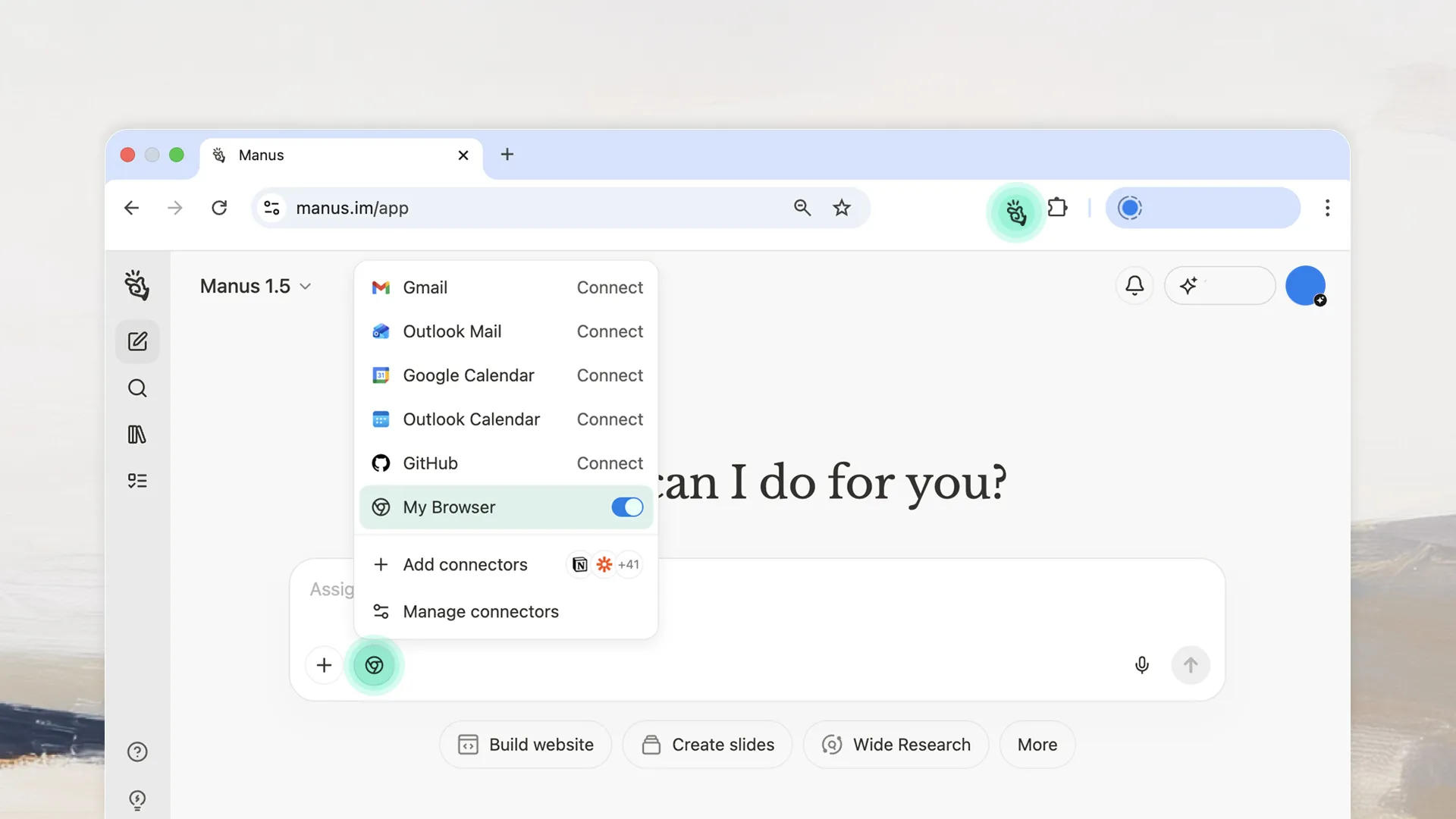
The way you interact with the web is about to change. We are excited to introduce Manus Browser Operator, a browser extension that enables Manus to operate directly within your local browser environment.
This is a powerful extension that transforms your browser from a passive viewing tool into an active, intelligent agent. Manus can now securely take action within your pages, executing complex tasks as if you were doing them yourself.
Two Browsers, One Unified Experience
Manus has always operated through a cloud browser—a sandboxed environment that provides a clean, controlled workspace for AI automation. This architecture has enabled Manus to perform research, build websites, analyze data, and generate content without requiring any local setup.
The cloud browser remains essential. It provides isolation, consistency, and the ability to work across any device without installation. For most tasks, it is the ideal environment.
But there is a category of workflows where local access changes everything.
When you need to work with tools you are already logged into—premium research platforms, authenticated CRM systems—the local browser holds a structural advantage. Your sessions are already active. Your credentials are already trusted. Your IP is already recognized.
Manus Browser Operator brings these two environments together. You get the power of cloud automation when you need it, and the convenience of local access when it matters.
The Local Advantage: Trusted Connection, Reliable Access
When you authorize Manus to work in your local browser, the system views the activity as coming from your trusted local IP and browser session. There are no unfamiliar login attempts. No CAPTCHA interruptions. No session expiration.
The local browser provides:
•Trusted Local Connection: Activity originates from your machine's browser, ensuring smooth continuity with authenticated services.
•Reliability: Because the activity is viewed as legitimate, it reliably clears standard access barriers and ensures your sessions remain active.
Full Automation for Your Most Valuable Workflows
The real power of Manus Browser Operator lies in its ability to automate workflows using the tools you already pay for and rely on.
Manus can assist within pages you have permission to access, including:
•Premium Resources: Crunchbase, PitchBook, SimilarWeb, Financial Times, Semrush, Ahrefs—any tool or source you are subscribed to.
•Authenticated Systems: Your CRM platforms, proprietary data tools, or any service requiring login credentials.
Within these environments, Manus can execute complex, multi-step workflows: cross-referencing market data, synthesizing reports, extracting insights, and performing analysis—saving you hours of manual clicking and data transfer.
How It Works: A Simple, Three-Step Process
Getting started with Manus Browser Operator is straightforward.
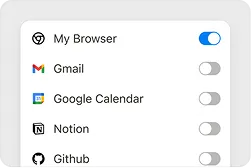
1. Activate the "My Browser" Connector
Navigate to your connectors and toggle on "My Browser." This tells Manus to use your local browser for tasks that require web access.
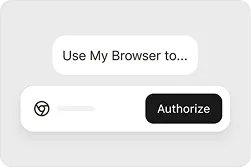
2. Authorize the Session
When you assign a task, Manus will request permission to take control. Click "Authorize" to grant one-time access. You remain in command of when and how Manus interacts with your browser.
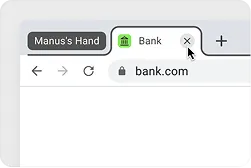
3. Monitor or Intervene in a Dedicated Tab
Once authorized, Manus opens a new tab within a tab group named after your current task. You can watch the task unfold in real-time, take over by clicking into the tab, or stop the process instantly by closing it.
Designed for Full Transparency and Control
We believe that powerful automation should come with complete peace of mind. Manus Browser Operator is built on a foundation of transparency and user control.
•Full Transparency & Control: Every action Manus takes is meticulously logged, providing a clear audit trail. If you need to stop a task instantly, simply close the dedicated tab.
•Access Anywhere (Local IP Advantage): Because Manus operates locally within your desktop browser, you can initiate and monitor tasks from your phone or another device. As long as your primary computer is online, your AI assistant is ready to work from anywhere.
Availability
Since 22 November 2025, Manus Browser Operator is available to all users. Chrome and Edge are currently recommended, with support for additional browsers coming soon.
Complex interactions such as drag-and-drop or multi-step forms may not work perfectly yet. If a site contains sensitive information, review what Manus will access before authorizing. You can always interrupt.
Your browser already works. Your logins. Your setup. Your habits. Experience an AI browser without changing a thing. Manus extends your reach. Your browser extends Manus's reach.
